
Convert PDF to EXE
Learn how to convert PDF files to EXE format using PDF2EXE software.
Convert PDF files online
We don’t have a dedicated online converter for PDF to EXE yet, but you can convert PDF files online to these and more formats:
How to convert pdf to exe file
- Documents
- No ratings yet.
PDF and EXE file formats
PDF (Portable Document Format) is widely used to represent documents independently of application software, hardware, and operating systems. PDF files encapsulate a complete description of a fixed-layout flat document, including the text, fonts, graphics, and other information needed to display it. EXE (Executable File) is a file format that contains a program capable of being executed or run as a program in the computer. EXE files are primarily associated with the Windows operating system, which installs or runs software applications.
Why convert PDF to an executable file?
Converting a PDF to an EXE file can help distribute documents in a format that includes a built-in viewer. This eliminates the need for recipients to install a specific PDF reader, which is particularly useful in environments where software installation is restricted.
Recommended software for PDF to EXE conversion
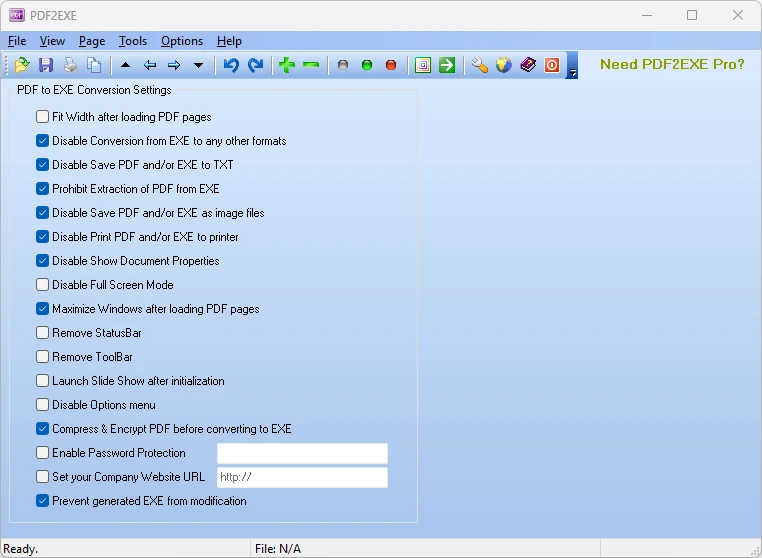
The best tool for converting PDF files to EXE is PDF2EXE. This software allows users to convert PDF documents into standalone executable files that can be opened on any Windows system without requiring additional software.
How to convert PDF to EXE using PDF2EXE
Follow these steps to convert a PDF file to an EXE format:
- Download and install PDF2EXE from its official website.
- Launch the program and click on File → Open to select the PDF you wish to convert.
- After opening the PDF, go to File → Export → EXE.
- Configure any desired settings, such as setting a password or adjusting the screen size.
- Click Convert to start the conversion process.
- Once the conversion is complete, you will have an executable file that contains your PDF document.
Note: Always ensure that the distribution of the EXE files complies with software distribution policies and copyright laws. It is also recommended not to run unknown .exe files on your computer; always check for viruses. Remember that you can't send executable files directly by email; files with the .exe extension are disabled by default in email attachments.
PDF vs EXE: format comparison
How the PDF and EXE formats compare on the properties that matter most for this conversion.
| Property | .PDF Portable Document Format | .EXE Portable Executable |
|---|---|---|
| Open standard | Yes | No |
| Compression | Both | Uncompressed |
| Typical file size | Medium | Large |
| Opens in a web browser | Yes, natively | No |
| Further editing | Limited | Not directly editable |
| Metadata support | Extensive | Extensive |
| Plain-text readable | No | No |
| Best used for | Publishing | Embedding in applications |
| Introduced | 1993 | 1993 |
| Developer | Adobe Systems (now Adobe Inc.); standardized by ISO | Microsoft |
| MIME type | application/pdf | — |
Suggested software and links: pdf to exe converters

Additional formats for
pdf file conversion
- pdf to sig
- pdf to inpage
- pdf to kml
- pdf to pmd
- pdf to docx
- pdf to ris
- pdf to txt
- pdf to idml
- pdf to p7s
- pdf to vsdx
- pdf to apk
- pdf to apkg
- pdf to aww
- pdf to bibtex
- pdf to bmp
- pdf to csi
- pdf to csv
- pdf to dat
- pdf to doc
- pdf to docm
- pdf to dot
- pdf to dotm
- pdf to dotx
- pdf to dox
- pdf to edx
- pdf to eml
- pdf to epf
- pdf to ete
- pdf to exp
- pdf to ical
- pdf to ind
- pdf to indb
- pdf to indd
- pdf to inp
- pdf to jnt
- pdf to key
- pdf to keynote
- pdf to mcdx
- pdf to mcw
- pdf to mdb
- pdf to mht
- pdf to mp3
- pdf to mpp
- pdf to msw
- pdf to mxl
- pdf to numbers
- pdf to odt
- pdf to one
- pdf to oxps
- pdf to p65
- pdf to pages
- pdf to pdg
- pdf to pgp
- pdf to ppt
- pdf to pub
- pdf to qxp
- pdf to rtf
- pdf to sam
- pdf to scrivx
- pdf to sdocx
- pdf to spd
- pdf to tns
- pdf to txf
- pdf to vce
- pdf to vdx
- pdf to vsd
- pdf to wav
- pdf to wave
- pdf to word
- pdf to wp
- pdf to wp5
- pdf to wpd
- pdf to wps
- pdf to wri
- pdf to xdp
- pdf to xls
- pdf to xlsx
- pdf to xmcd
- pdf to xml
- pdf to xps
- pdf to xxx
- pdf to zip