
Convert C4D to FBX
How to convert or export Cinema 4D files to FBX format.
Make FBX files online
We can't read C4D files yet, so this conversion isn't available. If you can export your work to one of these formats - or others - we'll turn it into FBX:
How to convert c4d to fbx file
- 3D modeling
- No ratings yet.
In the world of 3D modeling and animation, the need to convert files between different formats is a common task. Whether you’re collaborating with colleagues on a 3D project or simply trying to streamline your workflow, the ability to quickly convert c4d to fbx can be a critical skill. C4D and FBX are powerful and versatile file formats used in various industries, from film and television to gaming and virtual reality.
What is a C4D file?
The C4D file format is native to Cinema 4D, a popular 3D modeling, animation, and rendering program developed by Maxon. Cinema 4D is known for its user-friendly interface and robust feature set, making it a top choice for professional artists and hobbyists. C4D files contain detailed information about 3D scenes, including geometry, textures, lights, and animation data.
What is an FBX file?
The FBX file format (short for Filmbox) is a widely used 3D exchange format developed by Kaydara and later acquired by Autodesk. It’s designed to enable efficient sharing of 3D data (including models, scenes, textures, lighting, rigs, animations, and more) across different software applications. Because of its comprehensive support for various 3D elements, FBX has become an industry-standard format in fields like gaming, film, and virtual reality.
Whether you’re moving assets between 3D programs such as Maya, 3ds Max, or Cinema 4D - or game engines like Unity or Unreal - FBX often ensures that complex 3D data is preserved accurately, minimizing the need for extensive rework.
How to convert C4D to FBX
The simplest way to convert c4d to fbx is to use Cinema 4D itself, provided you have access to it. Here’s how you can do it using built-in export functions:
- Open your C4D file in Cinema 4D.
- Go to File → Export in the top menu.
- Select FBX from the drop-down list of available formats.
- Adjust the export settings according to your needs (e.g., version compatibility, textures, animation, etc.).
- Click OK or Save to start the export.
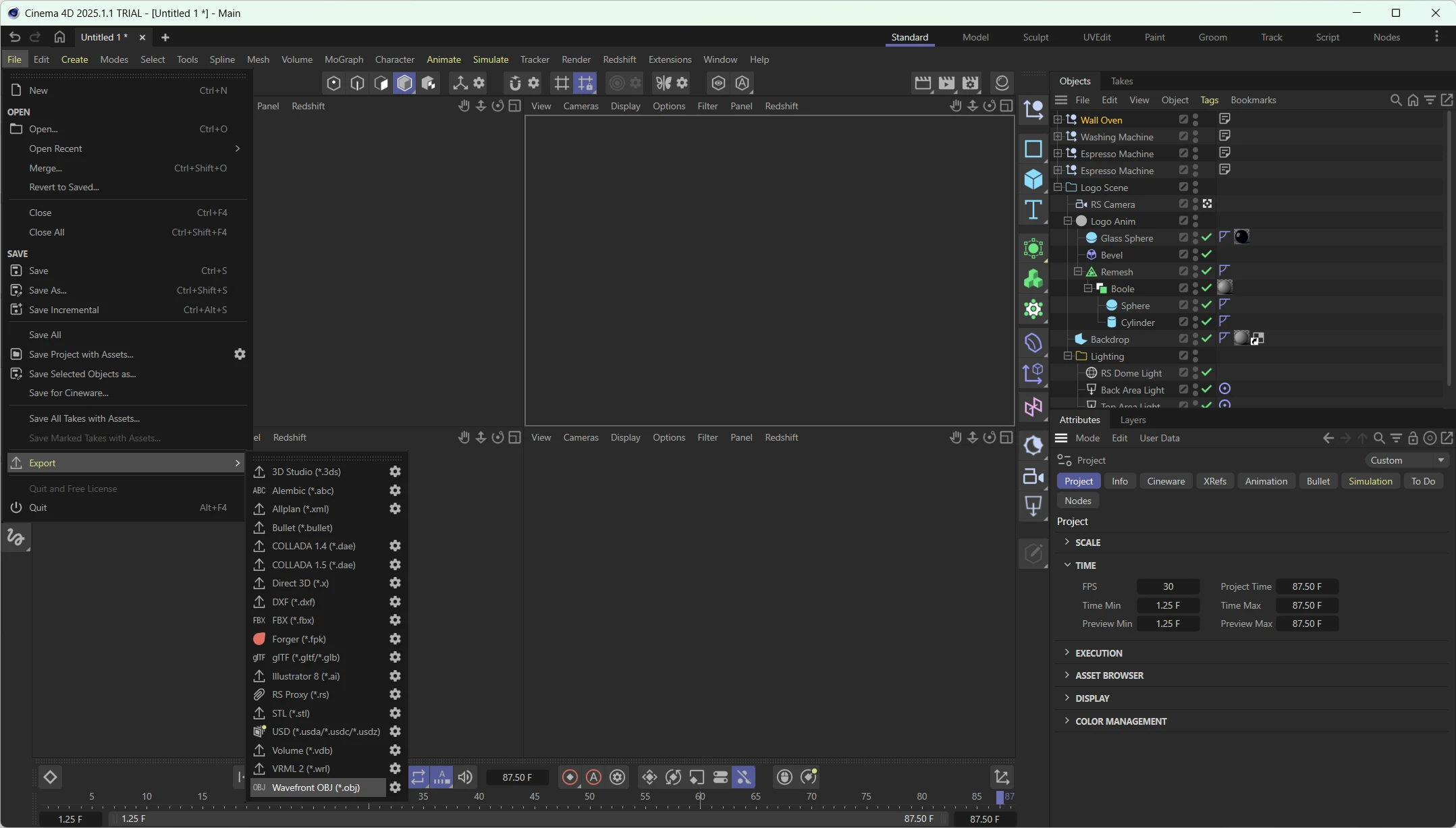
The default settings work well in most cases. Still, if you’re looking for specific optimizations or features (like including animations or limiting file size), you can refine the options in the export dialog box.
If you’re dealing with batch conversions or don’t have Cinema 4D installed, you might rely on a converter tool. Some free online converters claim to handle C4D files, but be cautious about file size limitations, potential data loss, or security concerns when uploading proprietary 3D assets.
3. Best software for converting C4D to FBX
While third-party converters exist, Cinema 4D is still the best software for performing a c4d to fbx conversion, thanks to its direct export capabilities. You retain control over the final file, have access to the most accurate export settings, and avoid compatibility or data loss issues.
If you do not own Cinema 4D or prefer using an alternate workflow, there are a few reputable options:
- Autodesk FBX Converter: A free tool from Autodesk that can convert various 3D formats to and from FBX. However, its support for C4D files may vary by version.
- Okino’s PolyTrans: A professional-level converter capable of handling many complex data types but with a higher price tag.
- Blender (with plugins): Though Blender doesn’t natively import C4D files, specific plugins allow you to import or convert them. Once imported, you can export to FBX.
Here’s an example of using the Autodesk FBX Converter via command line to convert a file:
FBXConverter.exe -c "C:\Path\to\File.c4d" "C:\Path\to\OutputFile.fbx"Always verify the resulting file by opening it in a 3D application that supports FBX, no matter which converter or software you choose. Check that the geometry, textures, and animations (if applicable) are intact.
Converting C4D to FBX doesn’t have to be daunting. By understanding the advantages of each format and leveraging the right tool - preferably Cinema 4D itself - you’ll ensure your 3D assets maintain their quality and functionality across multiple platforms.
C4D vs FBX: format comparison
How the C4D and FBX formats compare on the properties that matter most for this conversion.
| Property | .C4D Cinema 4D scene file | .FBX Filmbox |
|---|---|---|
| Geometry | Both | Both |
| Materials | Yes | Limited |
| Textures | Embedded in the file | Embedded in the file |
| Animation | Yes | Yes |
| Scene hierarchy | Yes | Yes |
| Plain-text readable | No | No |
| Typical file size | Large | Large |
| Open standard | No | Partly open |
| Introduced | 1990 | 1996 |
| Developer | Maxon Computer GmbH | Autodesk |
| MIME type | — | application/octet-stream |
Suggested software and links: c4d to fbx converters




Frequently asked questions
Will my Cinema 4D materials and textures transfer to FBX?
Basic materials and texture references may transfer, but complex or renderer-specific materials often need to be rebuilt. Textures can also appear missing if the FBX does not retain their file paths or the material setup is unsupported.
Are Cinema 4D animation and MoGraph effects preserved in FBX?
Standard object and keyframe animation usually transfers, but many MoGraph effects, simulations, deformers, and procedural generators do not remain editable. Bake these effects to animation or geometry when the receiving software cannot reproduce them.
Why does my FBX look different from the original C4D scene?
Differences usually come from unsupported materials, modifiers, lights, cameras, axis settings, or unit conversions during export. Check the scene scale, coordinate system, normals, and whether procedural objects were converted to regular geometry.
Can I edit an FBX file like a Cinema 4D file after conversion?
No, an FBX file does not preserve the full editable Cinema 4D scene structure. Meshes, bones, and some animation data can remain editable, but procedural setups, native modifiers, and renderer-specific settings may be flattened or lost.
Additional formats for
c4d file conversion
- c4d to obj
- c4d to png
- c4d to mp4
- c4d to cad
- c4d to ps
- c4d to dwg
- c4d to dae
- c4d to step
- c4d to blender
- c4d to bvh
- c4d to 3d
- c4d to 3dm
- c4d to 3ds
- c4d to 3dsmax
- c4d to avi
- c4d to blend
- c4d to bmp
- c4d to cdr
- c4d to dea
- c4d to fpx
- c4d to fxb
- c4d to gif
- c4d to jpeg
- c4d to lwo
- c4d to ma
- c4d to mb
- c4d to onj
- c4d to opj
- c4d to pmx
- c4d to pts
- c4d to raw
- c4d to slt
- c4d to spf
- c4d to stl
- c4d to stp
- c4d to tif
- c4d to tiff
- c4d to u3d
- c4d to wmv
- c4d to wrl
- c4d to x
- c4d to x3d
Reverse conversion
Convert to fbx from
other formats
- unitypackage to fbx
- rvt to fbx
- iam to fbx
- dsf to fbx
- model to fbx
- bvh to fbx
- abc to fbx
- max to fbx
- mdl to fbx
- 3mf to fbx
- 3dm to fbx
- 3ds to fbx
- 3dsmax to fbx
- anim to fbx
- asc to fbx
- ase to fbx
- asm to fbx
- b3d to fbx
- bio to fbx
- bip to fbx
- blend to fbx
- blend1 to fbx
- blender to fbx
- bmp to fbx
- br3 to fbx
- br6 to fbx
- br7 to fbx
- bsk to fbx
- c3d to fbx
- catdrawing to fbx
- catpart to fbx
- catproduct to fbx
- cd4 to fbx
- cel to fbx
- cob to fbx
- crz to fbx
- dae to fbx
- daz to fbx
- ddf to fbx
- dds to fbx
- dff to fbx
- drf to fbx
- duf to fbx
- dwf to fbx
- dwg to fbx
- exp to fbx
- flt to fbx
- gif to fbx
- glb to fbx
- gltf to fbx
- ies to fbx
- ifc to fbx
- iges to fbx
- igs to fbx
- img to fbx
- ipt to fbx
- iv to fbx
- ive to fbx
- jpeg to fbx
- jpg to fbx
- jt to fbx
- kml to fbx
- kmz to fbx
- lwo to fbx
- lws to fbx
- lxo to fbx
- ma to fbx
- mac to fbx
- maya to fbx
- mb to fbx
- md2 to fbx
- md5anim to fbx
- md5mesh to fbx
- mhx to fbx
- mqo to fbx
- mud to fbx
- neu to fbx
- obj to fbx
- pcd to fbx
- phy to fbx
- ply to fbx
- pmd to fbx
- pmx to fbx
- png to fbx
- pp2 to fbx
- prj to fbx
- prt to fbx
- psd to fbx
- pz2 to fbx
- pzz to fbx
- rpf to fbx
- sat to fbx
- sbsar to fbx
- scad to fbx
- scn to fbx
- shp to fbx
- skb to fbx
- skp to fbx
- sldasm to fbx
- sldprt to fbx
- spt to fbx
- step to fbx
- stl to fbx
- stp to fbx
- t3d to fbx
- tga to fbx
- tif to fbx
- tiff to fbx
- txt to fbx
- u3d to fbx
- usd to fbx
- usda to fbx
- usdc to fbx
- usdz to fbx
- webp to fbx
- wrl to fbx
- x to fbx
- x3d to fbx
- x_b to fbx
- xmt_txt to fbx
- xsi to fbx
- z3d to fbx