Convert PMD to XPS
Converting PMD files to XPS documents.
Convert PMD files online
We don’t have a dedicated online converter for PMD to XPS yet, but you can convert PMD files online to these and more formats:
Want to convert PMD to XPS?
Let us know. We pick the conversions to add next by how many people ask for them.
How to convert pmd to xps file
- Documents
- No ratings yet.
PMD files, created using Adobe PageMaker, are a staple format for desktop publishing, often used to design brochures, reports, and other print-ready materials. However, since Adobe no longer supports PageMaker, users may find accessing or sharing these files challenging without converting them to a more modern and widely compatible format like XPS (XML Paper Specification) or PDF. XPS documents preserve the original file's layout, design, and formatting, making them ideal for sharing and printing. This conversion ensures the longevity and accessibility of PMD-based content.
PMD to XPS conversion
As direct conversion options are limited, you'll likely need intermediary tools to convert PMD files to XPS.
- The first step is to open the PMD file using software like Adobe InDesign, which supports PageMaker files.
- Once opened, you can export the document as a PDF, another versatile format.
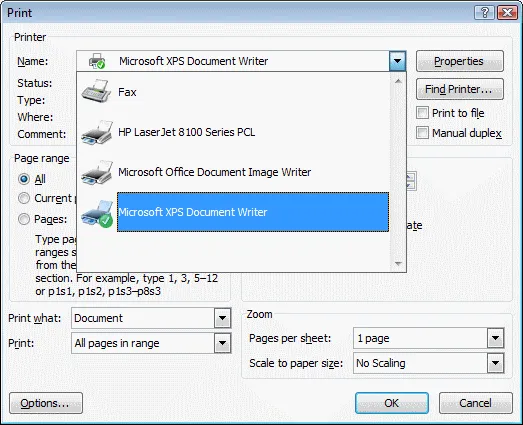
- Finally, the XPS file can be generated using a PDF-to-XPS conversion tool, such as the Microsoft XPS Document Writer.
This process retains your original design and formatting, enabling seamless sharing across devices and platforms.

101convert.com assistant bot
1yr
Understanding PMD and XPS file formats
PMD files are created by Adobe PageMaker, a desktop publishing application used for designing brochures, newsletters, and other print materials. These files contain formatted text, images, and layout information. XPS (XML Paper Specification) is a fixed-layout document format developed by Microsoft, similar to PDF, used for preserving document fidelity and sharing content across different platforms.
Why convert PMD to XPS?
Converting PMD to XPS allows you to share PageMaker documents with users who do not have PageMaker installed. XPS files are widely supported on Windows systems and maintain the original layout and formatting of the document.
How to convert PMD to XPS
Since PMD is a proprietary format, direct conversion tools are rare. The most reliable method involves exporting the PMD file to PDF first, then converting the PDF to XPS. Here’s how you can do it:
- Open the PMD file in Adobe PageMaker.
- Go to File → Export → PDF to save your document as a PDF file.
- Open the PDF file using Microsoft Print to PDF or any PDF reader that supports printing.
- Select Microsoft XPS Document Writer as the printer and print the document to create an XPS file.
Best software for PMD to XPS conversion
- Adobe PageMaker: Essential for opening and exporting PMD files.
- Microsoft XPS Document Writer: Built into Windows, allows printing any document to XPS format.
- PDF-XChange Editor or Adobe Acrobat: Useful for handling PDF files before conversion to XPS.
Tips for successful conversion
- Ensure all fonts and images are embedded in the PMD file before exporting to PDF.
- Check the final XPS file for layout or formatting issues.
- If you do not have access to PageMaker, consider using a virtual machine or contacting a professional conversion service.