Convert APK to HTML5
How to transform an APK Android app file to HTML5 web app.
Convert APK files online
We don’t have a dedicated online converter for APK to HTML5 yet, but you can convert APK files online to these formats:
Want to convert APK to HTML5?
Let us know. We pick the conversions to add next by how many people ask for them.
How to convert apk to html5 file
- Programming
- No ratings yet.
Converting an APK file to HTML5 is a technical process that involves transforming an Android application package into a web-friendly format. APK files are specific to Android platforms, while HTML5 is a markup language widely used for creating web applications.
Understanding the APK Android app to HTML5 conversion
APK files are built using Java or Kotlin with Android-specific APIs. They often include compiled code, assets, and manifest files. On the other hand, HTML5 apps are web-based and utilize technologies like HTML, CSS, and JavaScript. Since these two formats are inherently different, direct conversion isn’t possible. Instead, developers recreate the app using web technologies.
Steps to convert an APK file to HTML5
-
Analyze the APK Structure
Tools like APKTool or JD-GUI can decompile the APK and extract its components. This helps you understand the app’s logic, assets, and functionality.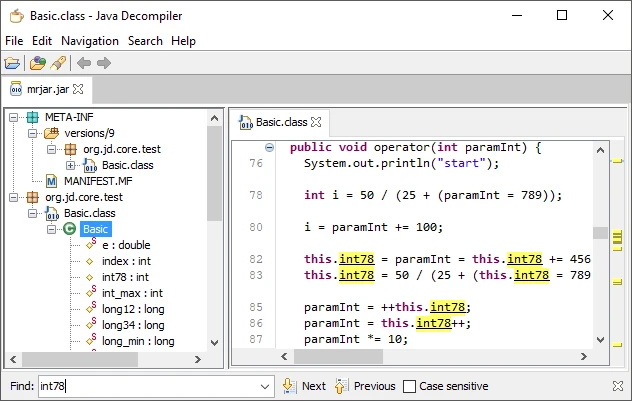
-
Recreate the App with web technologies
Rebuild the app from scratch using HTML5, CSS, and JavaScript. Use frameworks like React, Angular, or Vue.js to mimic the APK’s user interface and behavior. -
Port features and assets
Translate Android-specific features into web-compatible alternatives. For instance, replace Android APIs with web APIs. Convert multimedia assets to formats supported by HTML5. -
Test the web app
Use tools like Chrome DevTools to test your HTML5 app for functionality, performance, and responsiveness. Ensure cross-browser compatibility.
Tools to help the process
Several frameworks, such as Apache Cordova or Ionic, can assist in creating hybrid apps that function as APKs and HTML5 web apps. These tools provide a bridge between mobile and web technologies.
By carefully rebuilding the application with web technologies, you can achieve a seamless APK-to-HTML5 transformation, expanding your app’s reach to the web platform.
Direct APK to HTML5 conversion
Direct conversion from APK to HTML5 is impossible due to the fundamental differences between the two formats. APK files are native Android application packages built using languages like Java or Kotlin and designed to run on the Android operating system. They rely on Android-specific frameworks, APIs, and runtime environments. Conversely, HTML5 is a web-based language that uses HTML, CSS, and JavaScript and runs in a browser environment.
Why direct conversion isn’t possible
- Platform dependency: APKs depend on Android’s runtime and libraries, while HTML5 apps rely on browser engines for execution.
- Compiled code: APKs contain compiled code (in .dex format) that cannot directly translate to HTML5, which relies on interpretable code like JavaScript.
- Frameworks and APIs: Many Android-specific APIs, such as those for location services or notifications, have no direct equivalent in web technologies.
APK vs HTML5: format comparison
How the APK and HTML5 formats compare on the properties that matter most for this conversion.
| Property | .APK Android Package | .HTML5 HTML5 document |
|---|---|---|
| Open standard | No | Yes |
| Compression | Both | Uncompressed |
| Typical file size | Medium | Small |
| Opens in a web browser | No | Yes, natively |
| Further editing | Not directly editable | Easy |
| Metadata support | Basic | Basic |
| Plain-text readable | No | Yes |
| Best used for | Embedding in applications | Web publishing |
| Introduced | 2008 | 2014 |
| Developer | W3C / WHATWG | |
| MIME type | application/vnd.android.package-archive | text/html |
Information about file extensions and file types is provided by File-Extensions.org
Suggested software and links: apk to html5 converters




Frequently asked questions
Can I convert an APK to HTML5 without the app’s source code?
Usually, no: an APK contains compiled Android code and resources, not a ready-to-use HTML5 app. Recreating it for the web generally requires the source code or a substantial rewrite.
Will an APK’s Android features work in an HTML5 version?
Not automatically. Features that use Android-specific APIs, such as device services or notifications, need suitable web equivalents and may need to be rewritten.
Will the app’s layout and graphics stay the same when converted from APK to HTML5?
They are not guaranteed to stay the same because Android screens and web pages use different layout and interface systems. The appearance usually needs to be adapted and tested across browsers and screen sizes.
Why does converting an APK to HTML5 sometimes fail?
An APK may contain compiled code or native libraries that cannot be translated directly into browser code. Without accessible source code or web-compatible replacements for those parts, the app may not work as a web app.